
Bangs Filter
This bangs filter adds one of six fringes to your selfie and keeps your length, color and face. Your first image is free, no sign-up.
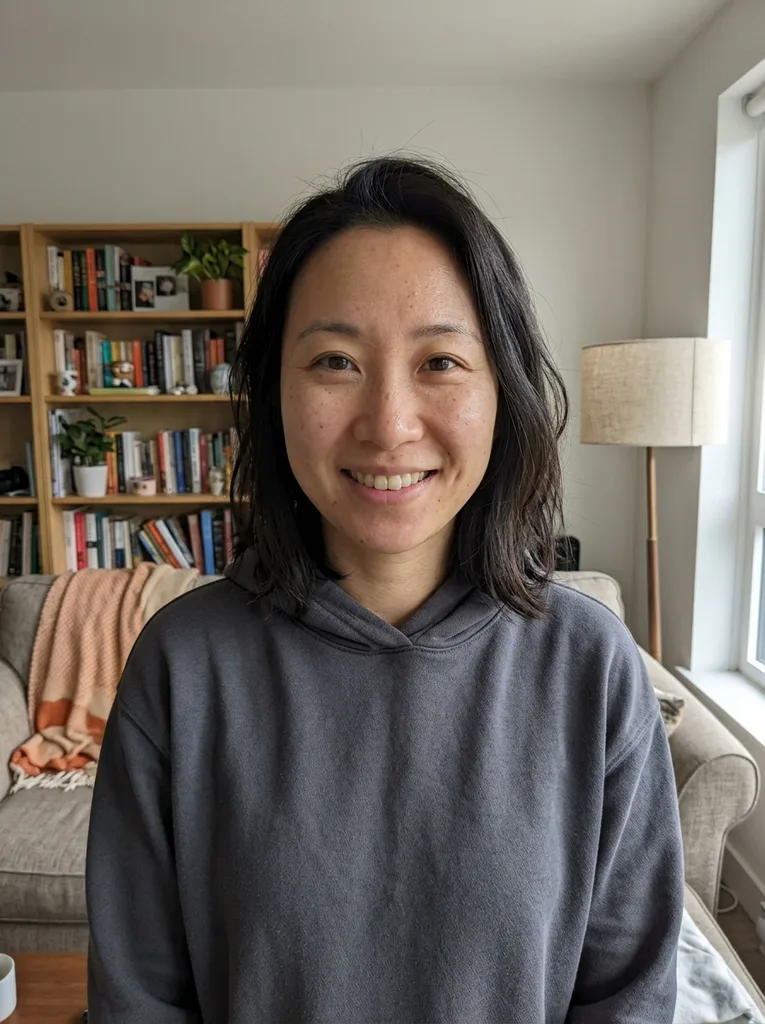 Before
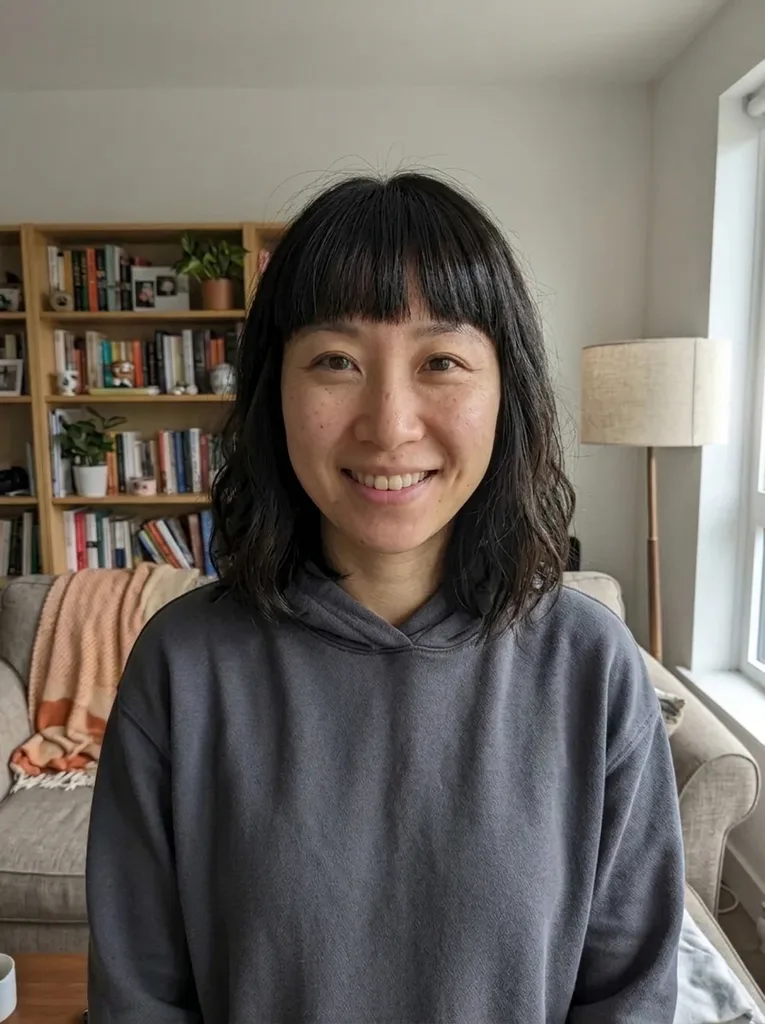 After
Example result. Upload your photo to make yours.
Examples
BeforeAfter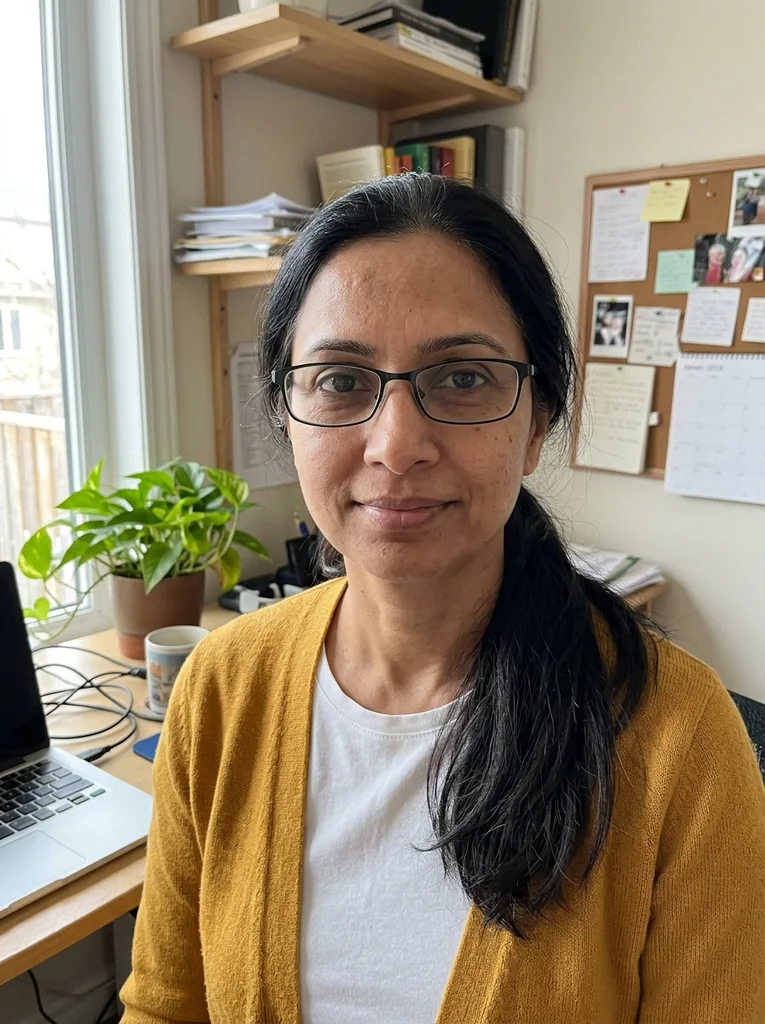 Before
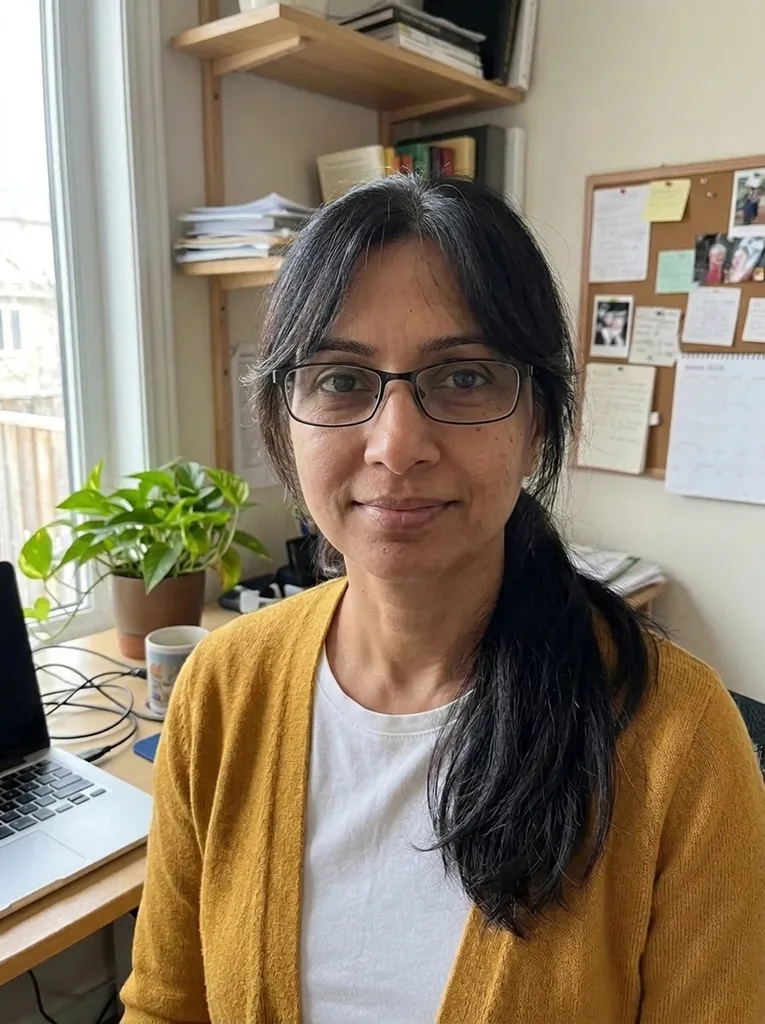 After
How to use the bangs filter
One photo, one choice of fringe, usually under a minute of waiting.
- 1
Upload a selfie with your forehead showing
One person, whole head in the frame. JPEG, PNG, WebP or HEIC up to 10 MB; hair pulled back gives the bangs filter the most room.
- 2
Pick one of six bangs
Choose Curtain, Blunt, Wispy, Side-Swept, Birkin or Micro Bangs. Add an optional note such as "slightly longer" or "curly bangs".
- 3
Compare and download
You get a 3:4 portrait shown next to your original. Download it right away, because results are only kept for a limited time.
Why this bangs filter changes only the fringe
Bangs are a small cut with a big effect, so the preview leaves everything else alone.
Only the fringe changes
The model is told to keep the rest of your hair at its length, color and texture and only add or reshape the fringe. In our ponytail test, the ponytail stayed and Curtain Bangs were added.
Same face, same glasses
The model is told to keep eyebrows, eyes, skin, makeup and glasses as they are. No beautifying, no face slimming, no skin smoothing.
Six fringe shapes
Each preset describes a different fringe. Blunt stops above the brows, Birkin reaches the lashes, Micro sits high on the forehead, Curtain sweeps out to the cheekbones, Wispy is thin and Side-Swept falls to one side.
A note for the details
Up to 500 characters, added to your request to the model. Ask for a longer fringe, curly bangs or a lighter cut.
No app, no account
It runs in the browser on your phone or computer. Nothing to install and nothing to sign up for.
Six bangs filter styles compared
Where each preset sits and what to look for on your own photo. Ask your stylist how each would work with your hair and how it grows out.
| Where it sits | What to check in the preview | Worth previewing if | |
|---|---|---|---|
| Curtain Bangs | Parted in the middle, sweeping to the cheekbones | Whether the sweep clears your glasses | You want a soft, face-framing fringe |
| Blunt Bangs | Thick and straight across, just above the brows | Where the line meets your brows or frames | You want a strong, straight line |
| Wispy Bangs | Thin and light, with forehead showing through | How much forehead still shows | You want a light fringe with little weight |
| Side-Swept Bangs | Long, brushed across the forehead to one side | Which side it falls to and how far | You want to cover part of your forehead |
| Birkin Bangs | Long and piecey, brushing the eyelashes | Whether it sits too close to your eyes | You like a long, piecey look |
| Micro Bangs | Short, cut high on the forehead | How much forehead it leaves bare | You want the boldest of the six |
Who reaches for a bangs filter
A trim is already booked
You keep going back and forth before the appointment. See the fringe on your own face, then keep or move the booking.
You wear glasses
A fringe sits right on your frames. Your glasses stay in the picture, so you can see whether Blunt Bangs hit the top rim or Curtain Bangs clear it.
Your hair is long or tied back
Pulled-back hair leaves room for a new fringe. In our test, a ponytail selfie with Curtain Bangs came out clean and easy to judge, and the ponytail stayed.
Your old fringe grew out
The bangs filter can reshape an existing fringe as well as add one. See a fresh Blunt or Birkin cut before deciding to re-cut or let it go.
You need to brief a stylist
"Not too short" means something different to everyone. Bring the download to the chair and point at where the fringe should end.
What would I look like with bangs? Read the preview well
Check three things. First, where the fringe ends against your brows and eyes: Blunt Bangs stop just above the brows, Birkin Bangs brush the lashes. Second, how much forehead still shows, since that changes how long or round your face looks. Third, how the fringe meets the hair at your temples.
A bangs filter preview is one front view of one photo. It can't show cowlicks, how a fringe behaves after a windy day, or how it falls when you tilt your head. Treat it as a picture of the idea and talk the length through with your stylist.
Ponytail flip trick or bangs filter?
The classic trick: tie a high ponytail, flip the ends forward over your forehead and look in the mirror. It is free, you see it from every angle, and it uses your real hair. It only fakes a long, heavy fringe, though, and your hair has to be long enough to reach.
A bangs filter shows the actual cut shapes, including short ones the trick can't fake, such as Micro Bangs or a crisp blunt line. It also gives you a picture to keep. Use the trick to feel the weight on your forehead and the preview to settle shape and length.
Photo checklist for a realistic bangs preview
- Show your whole head, from the top of your hair to your chin, without cropping at the forehead.
- Pull your hair back off your face, or tie it in a ponytail, so the bangs filter has room for the new fringe.
- Face the camera in even light, with no strong light behind you.
- Take off hats and headbands, and keep hands away from the hairline.
- Use a plain phone selfie with no beauty filter, so skin and hair look true.
Bangs filter mistakes to avoid
Mistake: Uploading a short bob that already frames your face
Do this instead: The change can be tiny. In our test, Curtain Bangs on a short silver bob were barely visible, so expect the biggest difference on long or tied-back hair.
Mistake: Spending your free image on the safest cut
Do this instead: Soft shapes like Curtain and Wispy Bangs are easier to picture. Preview the cut you are least sure of, such as Blunt or Micro Bangs.
Mistake: Leaving hair over your forehead
Do this instead: The model has to guess what is underneath. Pull it back before you take the photo.
Mistake: Expecting a side or back view
Do this instead: You get one front view. Ask your stylist how the fringe will blend at the sides.
Mistake: Writing a vague note like "make it nice"
Do this instead: Write what you would tell a stylist: "slightly longer", "curly bangs" or "ends at the lashes".
What's free and what happens to your photo
One free image per visitor
It covers the whole site, with no sign-up and no credit card. After that the tool stops, so choose the bangs you most want to see before you run the bangs filter.
Your photo stays yours
Your photo is only used to create your images and is never used to train AI models. Any note you type is added to your request to the AI model. You must be 18 or older, and photos of minors are not allowed.
A preview, not a guarantee
The result is an AI picture of the idea. A stylist may not cut it exactly the same way, and your hair's texture and cowlicks will have a say.