
Beard Filter
A beard filter that adds facial hair to your photo and leaves your head hair alone. Seven styles, color matched to you, first image free.
 Before
 After
Example result. Upload your photo to make yours.
Examples
BeforeAfter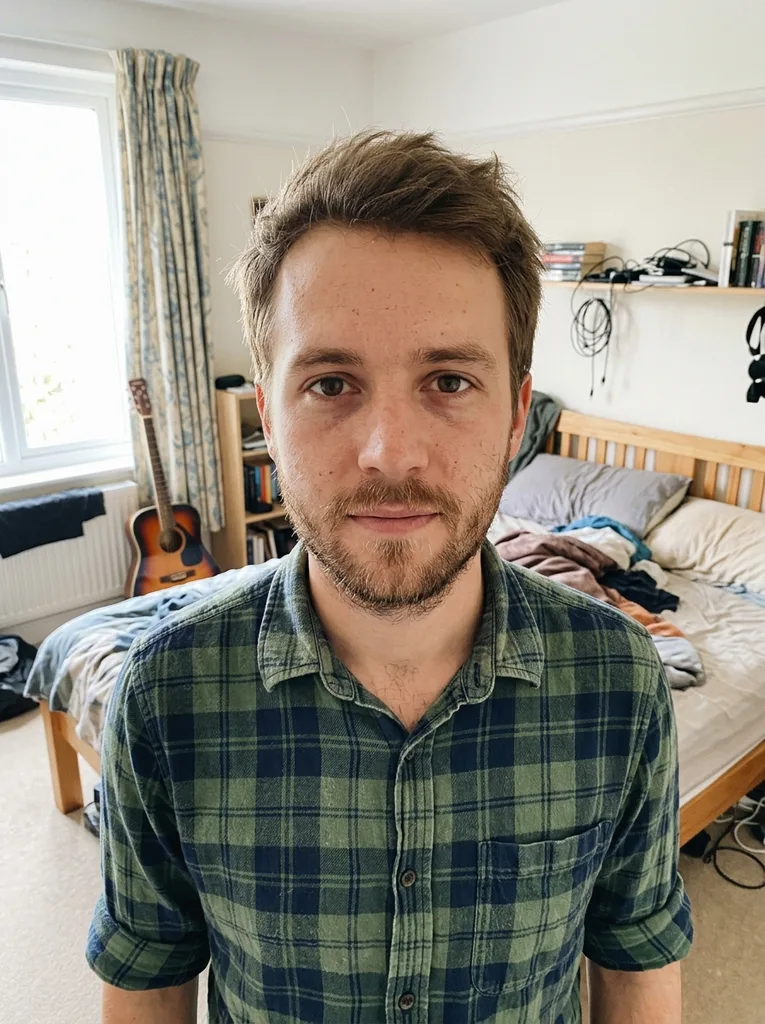 Before
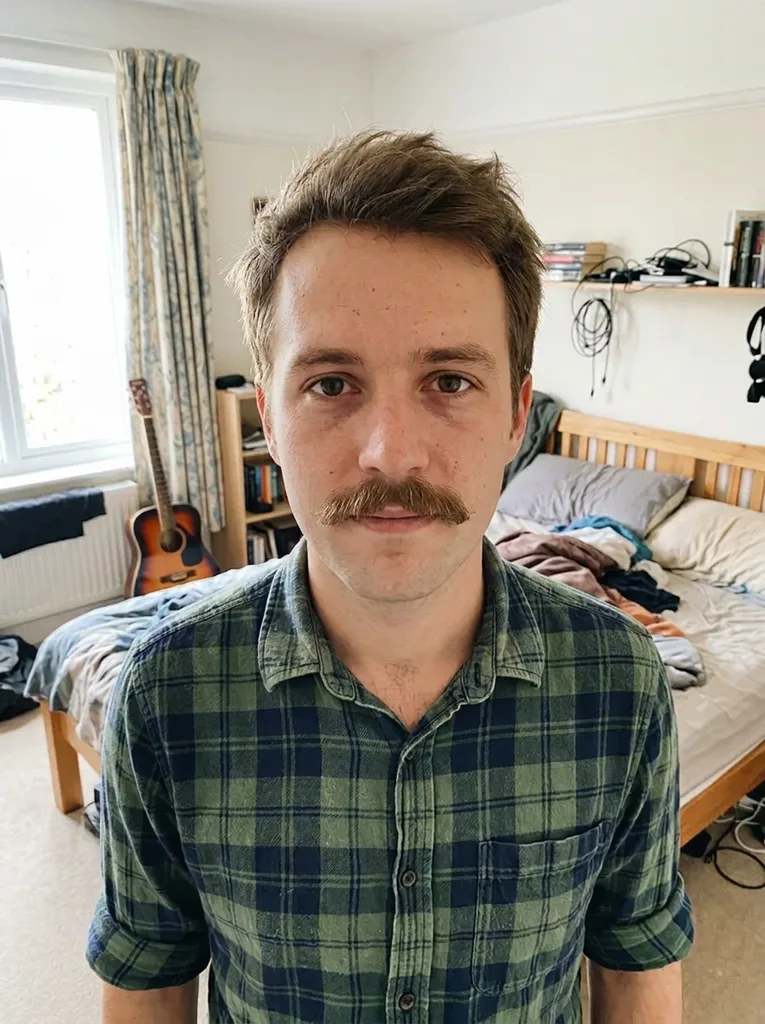 After
How to use the beard filter
- 1
Upload one clear selfie
JPEG, PNG, WebP or HEIC up to 10 MB, one person, chin and jaw in view. HEIC is converted to JPEG in your browser before upload.
- 2
Pick the beard or mustache
Choose one of seven styles, from Stubble to Long Beard. If you want a color other than your own, type it in the optional box, such as grey beard or red beard.
- 3
Compare and download
Your result is usually ready in under a minute as a 3:4 portrait, shown next to your original. Download it right away, because the image is only kept for a limited time.
What this beard simulator keeps and changes
The prompt behind every style asks for one change only: facial hair.
Only the facial hair changes
The model is told to keep your head hair as it is unless your note asks for a change, along with face shape, skin, eyes, glasses, clothes, background and light, with no smoothing or slimming. In our tests the head hair did not change.
Color matched to your hair
The model is told to match the beard to your own hair and eyebrows, so a dark-haired man gets a dark beard and a blond man a blond one.
Ask for grey, red or patchy
The optional text box takes up to 500 characters. Use it to preview a greying beard, a ginger one, or a thinner, patchy beard closer to how yours really grows.
A still photo, not a live overlay
You get a photoreal 3:4 image with individual hairs, not an effect that floats over a video. You can save it and look at it again tomorrow.
Beard filter online vs a live lens vs growing it out
A lens is instant, growing it is the real answer; a photo preview sits in between.
| This beard filter | Live AR lens in a social app | Growing it out | |
|---|---|---|---|
| What you see | A photoreal still of you | A mask that tracks your face on video | The real thing |
| Time to an answer | Usually under a minute | Instant | Weeks of awkward stages |
| Your head hair | Kept unless your note asks | Depends on the lens | Unchanged |
| Beard color | Matched to you, or typed in | Set by the lens | Whatever grows |
| Install needed | No, runs in the browser | The social app | No |
| What you keep | A 3:4 image to download | A snap or a clip | The beard |
| Cost | First image free | Free with the app | Free, but slow |
When a beard generator saves you weeks
Before No Shave November
Run the beard filter on the style you have in mind before you commit to the itchy middle stretch of growing it.
Before a wedding or big event
Decide on a full beard or a clean jaw well ahead of the photos that will be around for years.
Goatee or full beard
The goatee keeps the cheeks clean and frames the mouth; the full beard covers the whole jaw. One preview settles which shape you mean.
A mustache on its own
Moustache and Handlebar both come with a clean-shaven face, so you see the lip line alone, a look that is hard to picture in a mirror.
A role or a costume
Actors and cosplayers can check a character's facial hair on their own face before buying a fake beard or growing one.
Seeing yourself grey
Type grey beard into the text box to preview the salt-and-pepper look years before it arrives.
Why the beard looks grown, not stuck on
A sticker-style beard filter pastes a pre-drawn beard over your chin. Here the model is told to grow facial hair from your skin, with a natural density and direction, following the shape of your jaw. It is also told to keep individual hairs visible and to avoid any drawn-on look.
In our own tests the results held up. A clean-shaven man in his early 40s came back with a full beard that sat on his jawline naturally. A man in his late 20s with stubble chose Moustache and got only a mustache, with the stubble shaved off. That means the filter can reshape facial hair you already have, not just add to it.
One honest limit: it shows how a style looks on your face, not whether your own beard will grow in that thick.
Photo tips for a realistic mustache filter result
- Keep your chin, jaw and upper lip fully in the frame, with nothing in front of them.
- Face the camera so both cheeks are visible; a side angle hides half the beard line.
- Use even light; a shadow under the jaw can make the new beard look patchy.
- No need to shave first; in our test, existing stubble was replaced by the chosen style.
- Take off hats and keep the whole head in view, not cropped at the forehead.
- Use a normal phone selfie without beauty filters or face smoothing.
Common beard filter mistakes
Mistake: Picking a style at random
Do this instead: You have one free image, so choose the beard you are actually thinking of growing.
Mistake: Resting a hand on your chin
Do this instead: Move hands, scarves and high collars away from the jaw before you take the photo.
Mistake: Expecting a clean shave
Do this instead: This beard filter adds or reshapes facial hair; every style puts some on your face.
Mistake: Typing a whole new look in the box
Do this instead: Keep the text to color or density, like grey beard or patchy beard. Your head hair is meant to stay the same.
What's free and what happens to your photo
One free image
Each visitor gets one free image across the whole site, with no sign-up and no credit card. There is no paid plan to upgrade to.
Your photo
Your photo is only used to create your images and is never used to train AI models. Anything you type in the text box is added to your request to the AI model. The site is for adults 18 and over, so upload only photos of adults.
A preview, not a promise
The beard filter result is an AI image of a style on your face. Your real beard may grow in thinner, lighter or in a different pattern, and a barber can't copy it hair for hair.